Yes-Brainer review
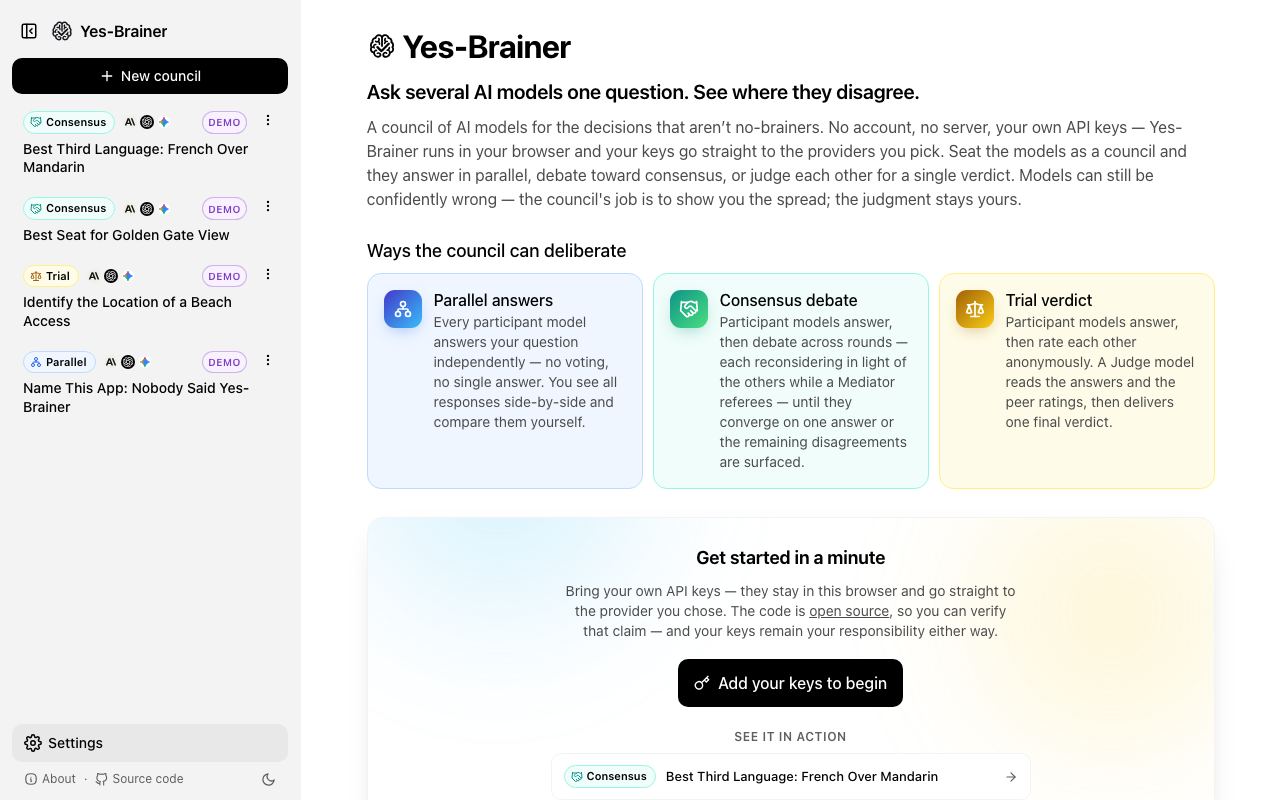
A council of large language models that debate ideas in the browser using your own API keys.
WireTensors rating
Time saved: Saves ~1–2 hours per week on decision-making by surfacing multiple reasoning approaches simultaneously, reducing back-and-forth between different tools..
Key facts
| Tool | Yes-Brainer |
|---|---|
| Category | Productivity |
| Pricing | Free (bring your own API keys) |
| Free tier | Yes |
| WireTensors rating | 3.8 / 5 |
| Best for | Teams and researchers who want to explore a question from multiple AI perspectives without relying on a single model's viewpoint. |
| Avoid if | You prefer all-inclusive pricing and do not want to manage separate API accounts and billing for multiple LLM providers. |
| Affiliate commission | Pending affiliate program review |
| Cookie window | N/A |
| Last verified | 2026-07-13 |
Overview
Yes-Brainer is a lightweight, browser-based application that invites users to pose a question or prompt to multiple large language models simultaneously, displaying their responses side-by-side in a 'debate' format. Users bring their own API keys from providers such as OpenAI, Anthropic, Google, or others, allowing them to choose which models participate in the debate. The tool performs no server-side processing; all API calls are made directly from the user's browser, meaning API costs and data handling are transparent and under user control. Each model receives the identical prompt and generates its response independently, making it easy to compare reasoning styles, factual accuracy, creativity, and potential blind spots across different architectures. The application is built as an open, client-side web interface with no authentication or account creation required. Because it is early-stage (recently launched on Hacker News with minimal visibility), it has no formal pricing structure, no freemium tiers, and relies entirely on users' existing subscriptions to LLM APIs. In comparison to agents like ChatGPT or Claude, Yes-Brainer does not attempt to solve a task or reason over multiple steps; instead it offers rapid, transparent comparison of how different models approach a single question. This positions it between a simple multi-model prompt interface and a more sophisticated agent orchestration platform. Limitations include the lack of integration with smaller or niche models, no persistent conversation history or saved comparisons, and reliance on the user's own API budget and understanding of LLM strengths and weaknesses.
Pros
- No proxy required; users control their own API credentials and data flow
- Multi-model debate format encourages exploration of different viewpoints on a single question
- Runs entirely in-browser with no server-side processing of user queries
Cons
- Requires users to manage and pay for their own API keys across multiple providers
- Early-stage tool with limited user base and minimal documentation or community support
- Debate output quality depends entirely on model selection and prompt engineering skill
Who it is for
- Best for: Teams and researchers who want to explore a question from multiple AI perspectives without relying on a single model's viewpoint..
- Avoid if: You prefer all-inclusive pricing and do not want to manage separate API accounts and billing for multiple LLM providers..
Who this is for
Product strategists, decision-makers, researchers, and analysts who need to evaluate ideas from multiple angles. This is particularly useful for roles like strategy consultants, UX researchers, and policy analysts who benefit from seeing how different AI models (each with different training, reasoning styles, and potential biases) approach the same prompt. Teams exploring complex problems where consensus from diverse perspectives adds confidence.
Who should skip this
Budget-conscious individuals who want simple, predictable pricing; those without existing API keys or familiarity with services like OpenAI, Anthropic, or Google; and users seeking a polished, well-documented product with extensive tutorials and customer support.
Verdict
Yes-Brainer is a straightforward tool for comparing multiple LLM perspectives in real time, suited to users comfortable managing their own API keys and willing to trade convenience for transparency and control. It does not replace specialised agents or automation tools, but fills a specific niche for exploratory reasoning and multi-model comparison. Early maturity and minimal documentation mean it is best suited to technically confident users and teams with existing LLM infrastructure.
User reviews
Real reader reviews — separate from WireTensors' own editorial rating above. Every submission is moderated before it appears here.
Loading reviews…
Write a review
Yes-Brainer FAQ
What is Yes-Brainer? +
Yes-Brainer is a lightweight, browser-based application that invites users to pose a question or prompt to multiple large language models simultaneously, displaying their responses side-by-side in a 'debate' format. Users bring their own API keys from providers such as OpenAI, Anthropic, Google, or others, allowing them to choose which models participate in the debate. The tool performs no server-side processing; all API calls are made directly from the user's browser, meaning API costs and data handling are transparent and under user control. Each model receives the identical prompt and generates its response independently, making it easy to compare reasoning styles, factual accuracy, creativity, and potential blind spots across different architectures. The application is built as an open, client-side web interface with no authentication or account creation required. Because it is early-stage (recently launched on Hacker News with minimal visibility), it has no formal pricing structure, no freemium tiers, and relies entirely on users' existing subscriptions to LLM APIs. In comparison to agents like ChatGPT or Claude, Yes-Brainer does not attempt to solve a task or reason over multiple steps; instead it offers rapid, transparent comparison of how different models approach a single question. This positions it between a simple multi-model prompt interface and a more sophisticated agent orchestration platform. Limitations include the lack of integration with smaller or niche models, no persistent conversation history or saved comparisons, and reliance on the user's own API budget and understanding of LLM strengths and weaknesses.
How much does Yes-Brainer cost? +
Yes-Brainer pricing: Free (bring your own API keys). Always confirm current pricing on the official site, as plans change.
Does Yes-Brainer have a free tier? +
Yes. Yes-Brainer offers a free plan or free credits you can use to evaluate it.
What is Yes-Brainer best for? +
Teams and researchers who want to explore a question from multiple AI perspectives without relying on a single model's viewpoint..
When should you avoid Yes-Brainer? +
Avoid Yes-Brainer if: You prefer all-inclusive pricing and do not want to manage separate API accounts and billing for multiple LLM providers..
What are the main pros of Yes-Brainer? +
No proxy required; users control their own API credentials and data flow; Multi-model debate format encourages exploration of different viewpoints on a single question; Runs entirely in-browser with no server-side processing of user queries.
What are the main cons of Yes-Brainer? +
Requires users to manage and pay for their own API keys across multiple providers; Early-stage tool with limited user base and minimal documentation or community support; Debate output quality depends entirely on model selection and prompt engineering skill.
Does Yes-Brainer have an affiliate program? +
No public affiliate program is listed for Yes-Brainer at the time of review.
How is Yes-Brainer rated? +
WireTensors rates Yes-Brainer 3.8 out of 5, based on capability, value, and fit for its intended use case.
What category does Yes-Brainer fall under? +
Yes-Brainer is categorised under productivity on WireTensors.
When was this Yes-Brainer review last verified? +
This review was last verified on 2026-07-13 against the vendor's official site.
Reviewed by Arjun Mehta
Editorial lead overseeing WireTensors' research, sourcing and verification process
Last verified:
Sources
- Yes-Brainer — official website — verified