Tempered review
AI-powered PC performance optimisation tool that monitors and improves system resources.
WireTensors rating
Time saved: Saves ~2–4 hours/month on system maintenance and troubleshooting if optimisations prevent crashes and slowdowns; actual gains depend on system state at start..
Key facts
| Tool | Tempered |
|---|---|
| Category | Productivity |
| Pricing | Pricing not publicly listed at time of review |
| Free tier | Yes |
| WireTensors rating | 3.4 / 5 |
| Best for | Windows or Linux users experiencing gradual PC slowdowns who want automated, hands-off system optimisation. |
| Avoid if | You require transparency into system modifications, use mission-critical infrastructure, or prefer manual control over system settings. |
| Affiliate commission | Pending affiliate program review |
| Cookie window | N/A |
| Last verified | 2026-08-15 |
Overview
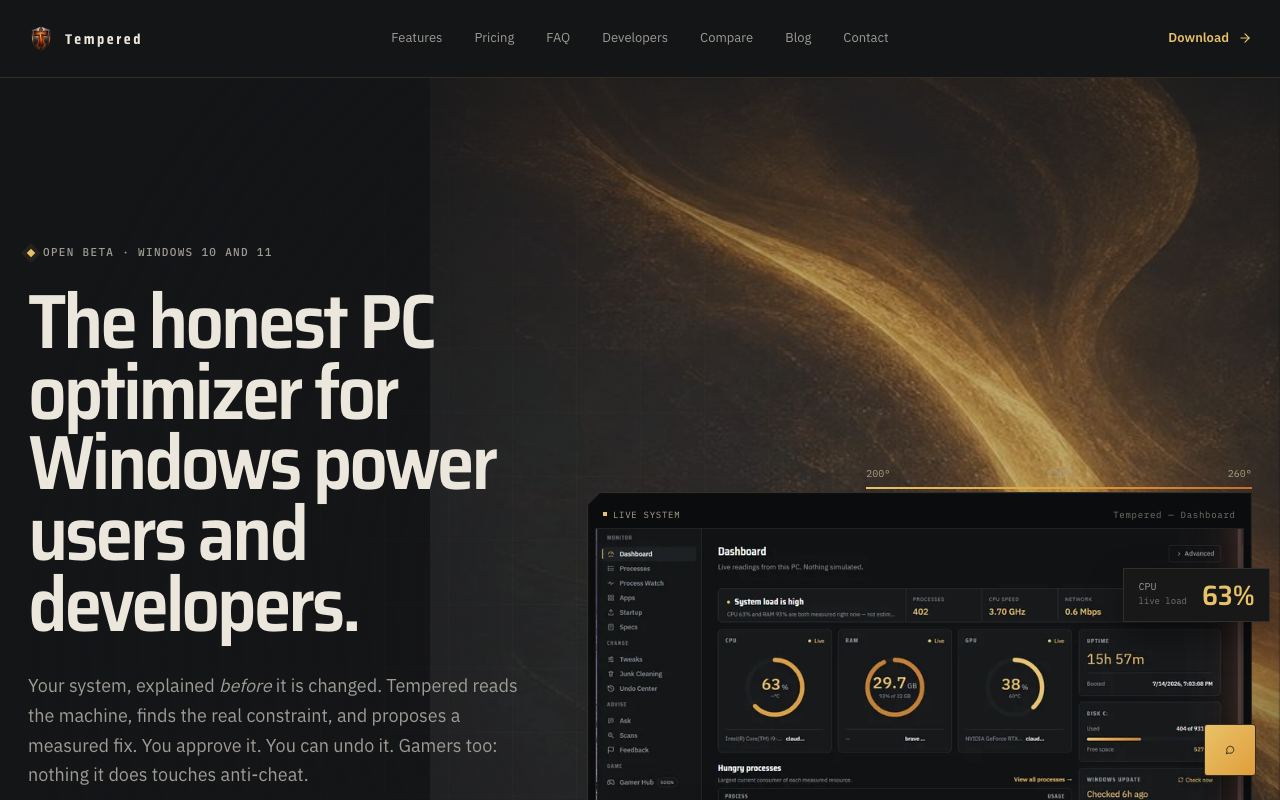
Tempered is an AI-powered PC optimisation utility that monitors system performance and automatically suggests or applies improvements to CPU, memory, disk, and network resources. Launched as a Show HN project (5 pts), it represents a new approach to system maintenance by using machine learning to identify performance patterns and bottleneck causes rather than relying on static rule sets. The underlying technology likely involves profiling system telemetry, pattern-matching against known slow-down signatures, and applying targeted fixes—such as defragmentation, process deprioritisation, or driver updates. Tempered is closed-source, and its exact model architecture and data practices are not publicly disclosed. No pricing has been announced; a free tier is available, but conversion and premium tier structure are unknown. Compared to established tools like CCleaner, Wise Care 365, or Windows' own Task Scheduler and Resource Monitor, Tempered claims to automate decision-making rather than surfacing options for manual review. The AI angle is novel but unproven at scale; independent benchmarks comparing Tempered's performance gains to baseline systems or competitors do not appear to be widely published. Typical use cases include post-bloatware cleanup on new PCs, reducing slowdowns on ageing systems, and maintaining responsiveness for resource-constrained machines. Main risks include lack of transparency about what system modifications occur, no clear rollback mechanism if an optimisation causes instability, and unproven safety profile for mission-critical systems. The tool is best evaluated in a non-essential machine first, with monitoring enabled to observe actual system changes before deploying to production or business-critical PCs.
Pros
- Automates system optimisation, reducing manual troubleshooting
- AI-driven approach may identify non-obvious performance bottlenecks
- Lightweight client designed for background operation
Cons
- Closed-source; no visibility into what system changes it makes
- Early-stage product with limited independent performance validation
- Risk profile unclear; aggressive optimisation could destabilise systems without rollback guarantees
Who it is for
- Best for: Windows or Linux users experiencing gradual PC slowdowns who want automated, hands-off system optimisation..
- Avoid if: You require transparency into system modifications, use mission-critical infrastructure, or prefer manual control over system settings..
Who this is for
Tempered is aimed at general PC users experiencing performance degradation—those whose systems have accumulated startup bloat, memory leaks, or background processes over time. Home office workers, students, and casual gamers seeking faster boot times and responsiveness without technical intervention are the primary audience. Users already familiar with traditional PC cleaning tools (CCleaner, Wise Care) but seeking a more automated, AI-guided approach may also find it relevant.
Who should skip this
Enterprise IT administrators, servers in production environments, and users running mission-critical applications should avoid Tempered until it gains independent security audits and rollback guarantees. Privacy-conscious users concerned about what background monitoring occurs should wait for clearer transparency disclosures. Advanced users preferring granular control over system changes should stick with manual tools or established system profilers.
Verdict
Tempered offers an intriguing AI-driven alternative to manual PC optimisation tools, addressing real user pain around system slowdown. Early-stage status and closed-source nature warrant caution; test on non-critical machines first and await independent performance audits before enterprise adoption.
User reviews
Real reader reviews — separate from WireTensors' own editorial rating above. Every submission is moderated before it appears here.
Loading reviews…
Write a review
Tempered FAQ
What is Tempered? +
Tempered is an AI-powered PC optimisation utility that monitors system performance and automatically suggests or applies improvements to CPU, memory, disk, and network resources. Launched as a Show HN project (5 pts), it represents a new approach to system maintenance by using machine learning to identify performance patterns and bottleneck causes rather than relying on static rule sets. The underlying technology likely involves profiling system telemetry, pattern-matching against known slow-down signatures, and applying targeted fixes—such as defragmentation, process deprioritisation, or driver updates. Tempered is closed-source, and its exact model architecture and data practices are not publicly disclosed. No pricing has been announced; a free tier is available, but conversion and premium tier structure are unknown. Compared to established tools like CCleaner, Wise Care 365, or Windows' own Task Scheduler and Resource Monitor, Tempered claims to automate decision-making rather than surfacing options for manual review. The AI angle is novel but unproven at scale; independent benchmarks comparing Tempered's performance gains to baseline systems or competitors do not appear to be widely published. Typical use cases include post-bloatware cleanup on new PCs, reducing slowdowns on ageing systems, and maintaining responsiveness for resource-constrained machines. Main risks include lack of transparency about what system modifications occur, no clear rollback mechanism if an optimisation causes instability, and unproven safety profile for mission-critical systems. The tool is best evaluated in a non-essential machine first, with monitoring enabled to observe actual system changes before deploying to production or business-critical PCs.
How much does Tempered cost? +
Tempered pricing: Pricing not publicly listed at time of review. Always confirm current pricing on the official site, as plans change.
Does Tempered have a free tier? +
Yes. Tempered offers a free plan or free credits you can use to evaluate it.
What is Tempered best for? +
Windows or Linux users experiencing gradual PC slowdowns who want automated, hands-off system optimisation..
When should you avoid Tempered? +
Avoid Tempered if: You require transparency into system modifications, use mission-critical infrastructure, or prefer manual control over system settings..
What are the main pros of Tempered? +
Automates system optimisation, reducing manual troubleshooting; AI-driven approach may identify non-obvious performance bottlenecks; Lightweight client designed for background operation.
What are the main cons of Tempered? +
Closed-source; no visibility into what system changes it makes; Early-stage product with limited independent performance validation; Risk profile unclear; aggressive optimisation could destabilise systems without rollback guarantees.
Does Tempered have an affiliate program? +
No public affiliate program is listed for Tempered at the time of review.
How is Tempered rated? +
WireTensors rates Tempered 3.4 out of 5, based on capability, value, and fit for its intended use case.
What category does Tempered fall under? +
Tempered is categorised under productivity on WireTensors.
When was this Tempered review last verified? +
This review was last verified on 2026-08-15 against the vendor's official site.
Reviewed by Arjun Mehta
Editorial lead overseeing WireTensors' research, sourcing and verification process
Last verified:
Sources
- Tempered — official website — verified