SideNote Pro review
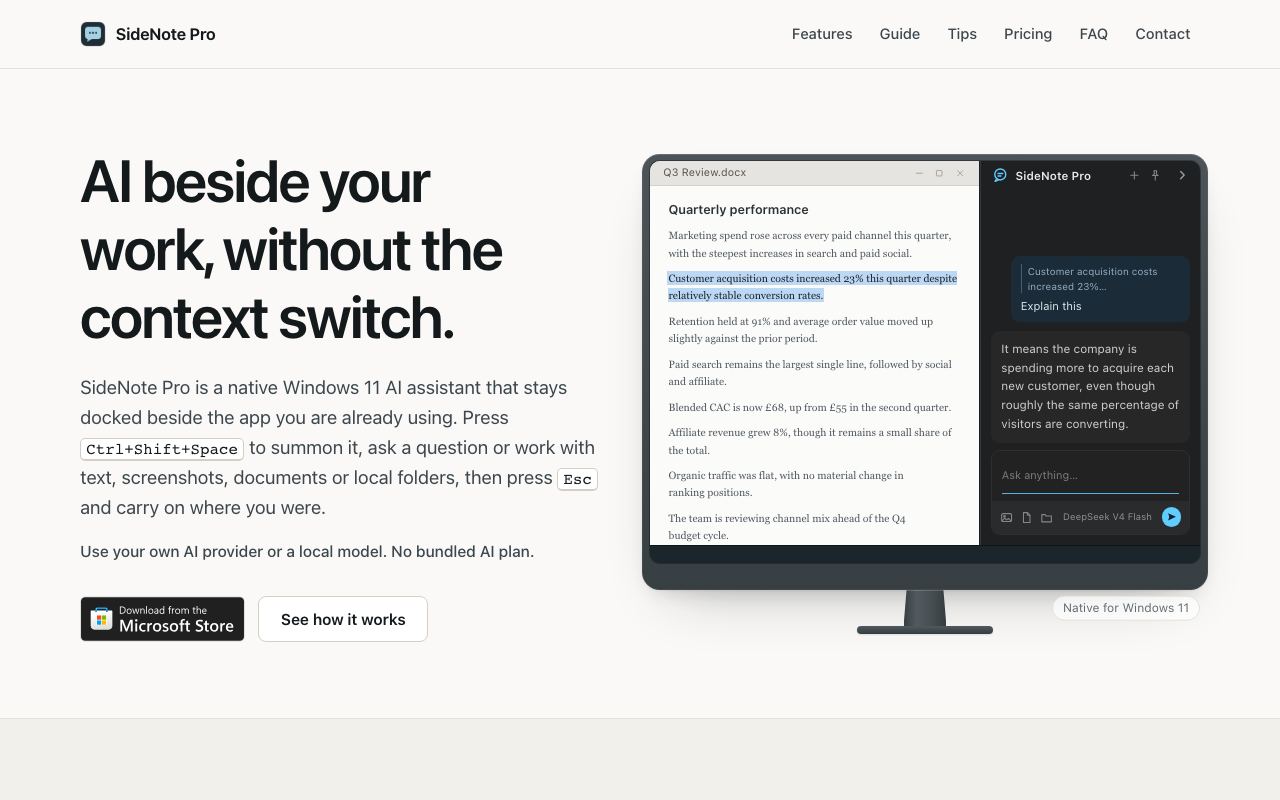
Native Windows 11 AI note-taking companion that runs beside your active work.
WireTensors rating
Time saved: Saves ~2–3 hours per week on context-switching and manual note organisation through persistent sidebar access and AI-assisted linking..
Key facts
| Tool | SideNote Pro |
|---|---|
| Category | Productivity |
| Pricing | Pricing not publicly listed at time of review |
| Free tier | No |
| WireTensors rating | 3.8 / 5 |
| Best for | Windows users who need to capture, organise, and reference information while actively working in other applications. |
| Avoid if | You use macOS or Linux exclusively, or require offline-first note-taking with zero cloud dependency. |
| Affiliate commission | Pending affiliate program review |
| Cookie window | N/A |
| Last verified | 2026-09-11 |
Overview
SideNote Pro is a Windows 11–native note-taking application designed to remain accessible at the edge of the screen while you work in other applications. Unlike browser-based tools (Notion, OneNote Web) or Electron apps, it leverages Windows 11's native APIs to sit persistently as a sidebar companion, reducing the cognitive and interaction cost of capturing ideas or references. The product integrates AI capabilities for note summarisation, automatic tagging, and cross-note linking, allowing users to build interconnected knowledge bases without manual organisation overhead. Under the hood, it uses cloud-based language models for AI features, though the exact vendor and model details are not yet public. SideNote Pro is positioned as a direct competitor to web-based note apps on Windows, trading browser accessibility for native performance and integration. It addresses a specific niche: Windows power users who find tab-switching disruptive and prefer a permanently visible note interface. The product launched via Show HN in September 2026 with minimal public documentation regarding features, pricing, or free-tier availability. Early feedback suggests the core value proposition—proximity and low friction—resonates with Windows-centric knowledge workers, though the roadmap for cross-device sync, offline mode, and integration with popular tools (Obsidian, Logseq) remains unclear.
Pros
- Native Windows 11 integration allows always-on access without context-switching
- Supports AI-assisted note organisation, summarisation, and linking
- Works alongside any application without requiring browser tab
Cons
- Limited ecosystem interoperability outside Windows 11
- AI capabilities depend on internet connectivity for most features
- Feature set and pricing model remain undocumented at launch
Who it is for
- Best for: Windows users who need to capture, organise, and reference information while actively working in other applications..
- Avoid if: You use macOS or Linux exclusively, or require offline-first note-taking with zero cloud dependency..
Who this is for
Knowledge workers, researchers, and product managers using Windows 11 who juggle multiple applications and need a persistent AI-assisted scratchpad. Developers, writers, and project managers who benefit from quick note capture and AI-powered summarisation without leaving their primary work window. Teams evaluating Windows 11-native productivity tools as alternatives to web-based note apps.
Who should skip this
macOS and Linux users. Organisations with strict data residency or offline-first requirements. Teams already invested in Notion, Obsidian, or OneNote and satisfied with their workflows. Users who prefer traditional file-based note storage over cloud-backed systems.
Verdict
SideNote Pro fills a genuine gap in Windows 11 productivity tooling by offering persistent, native note access. Its success will hinge on transparent pricing, clear AI capabilities, and timely integration partnerships. Currently worth monitoring for Windows-first organisations, but hold off on migration decisions until the product matures and documentation improves.
User reviews
Real reader reviews — separate from WireTensors' own editorial rating above. Every submission is moderated before it appears here.
Loading reviews…
Write a review
SideNote Pro FAQ
What is SideNote Pro? +
SideNote Pro is a Windows 11–native note-taking application designed to remain accessible at the edge of the screen while you work in other applications. Unlike browser-based tools (Notion, OneNote Web) or Electron apps, it leverages Windows 11's native APIs to sit persistently as a sidebar companion, reducing the cognitive and interaction cost of capturing ideas or references. The product integrates AI capabilities for note summarisation, automatic tagging, and cross-note linking, allowing users to build interconnected knowledge bases without manual organisation overhead. Under the hood, it uses cloud-based language models for AI features, though the exact vendor and model details are not yet public. SideNote Pro is positioned as a direct competitor to web-based note apps on Windows, trading browser accessibility for native performance and integration. It addresses a specific niche: Windows power users who find tab-switching disruptive and prefer a permanently visible note interface. The product launched via Show HN in September 2026 with minimal public documentation regarding features, pricing, or free-tier availability. Early feedback suggests the core value proposition—proximity and low friction—resonates with Windows-centric knowledge workers, though the roadmap for cross-device sync, offline mode, and integration with popular tools (Obsidian, Logseq) remains unclear.
How much does SideNote Pro cost? +
SideNote Pro pricing: Pricing not publicly listed at time of review. Always confirm current pricing on the official site, as plans change.
Does SideNote Pro have a free tier? +
No. SideNote Pro does not offer an ongoing free plan, though a trial may be available.
What is SideNote Pro best for? +
Windows users who need to capture, organise, and reference information while actively working in other applications..
When should you avoid SideNote Pro? +
Avoid SideNote Pro if: You use macOS or Linux exclusively, or require offline-first note-taking with zero cloud dependency..
What are the main pros of SideNote Pro? +
Native Windows 11 integration allows always-on access without context-switching; Supports AI-assisted note organisation, summarisation, and linking; Works alongside any application without requiring browser tab.
What are the main cons of SideNote Pro? +
Limited ecosystem interoperability outside Windows 11; AI capabilities depend on internet connectivity for most features; Feature set and pricing model remain undocumented at launch.
Does SideNote Pro have an affiliate program? +
No public affiliate program is listed for SideNote Pro at the time of review.
How is SideNote Pro rated? +
WireTensors rates SideNote Pro 3.8 out of 5, based on capability, value, and fit for its intended use case.
What category does SideNote Pro fall under? +
SideNote Pro is categorised under productivity on WireTensors.
When was this SideNote Pro review last verified? +
This review was last verified on 2026-09-11 against the vendor's official site.
Reviewed by Arjun Mehta
Editorial lead overseeing WireTensors' research, sourcing and verification process
Last verified:
Sources
- SideNote Pro — official website — verified