Froging AI review
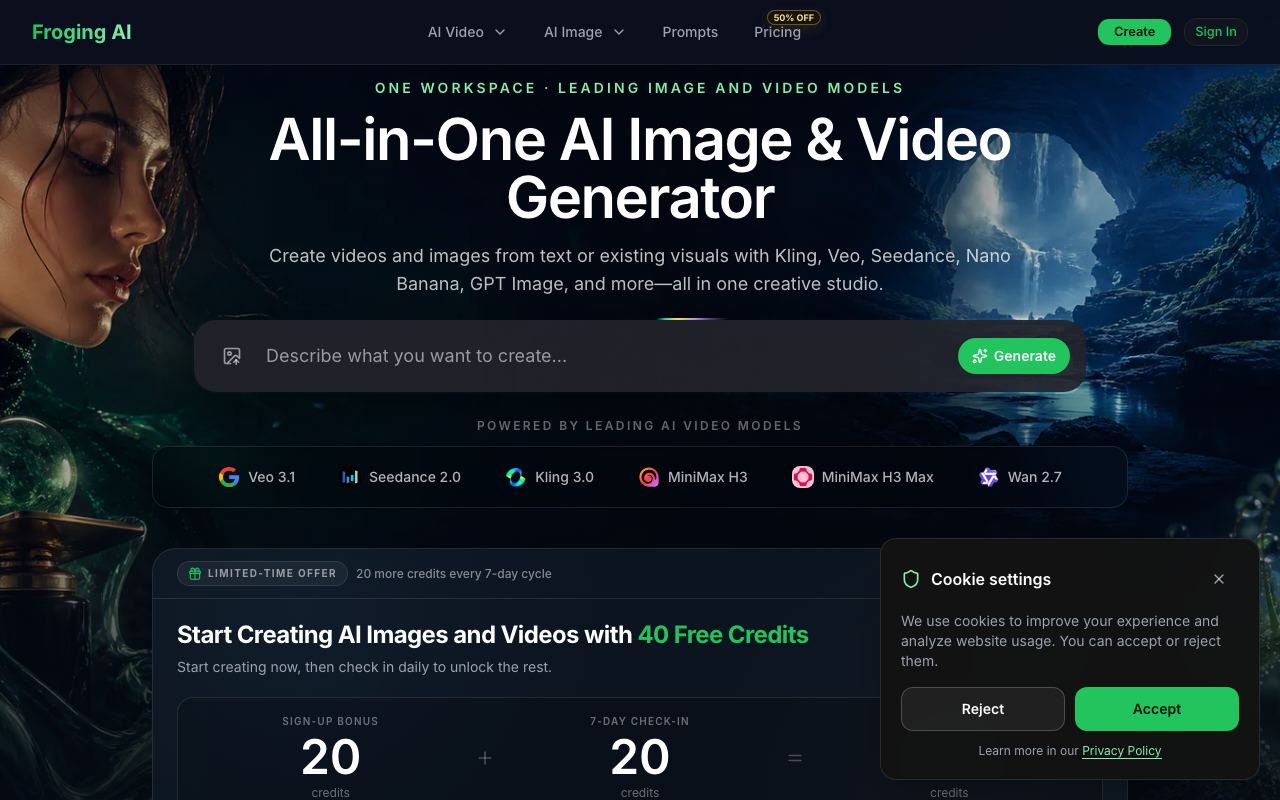
Unified workflow for image and video generation models in a single interface.
WireTensors rating
Time saved: Saves approximately 2–3 hours per week by consolidating model testing and asset export workflows into one environment instead of juggling separate web interfaces..
Key facts
| Tool | Froging AI |
|---|---|
| Category | Image |
| Pricing | Pricing not publicly listed at time of review |
| Free tier | No |
| WireTensors rating | 3.8 / 5 |
| Best for | Creative teams and content studios that generate both images and video clips and want to test multiple models without switching between platforms. |
| Avoid if | You need a mature platform with extensive documentation, large community support, or integrated asset management and collaboration features. |
| Affiliate commission | Pending affiliate program review |
| Cookie window | N/A |
| Last verified | 2026-08-24 |
Overview
Froging AI is a web-based platform that integrates multiple generative image and video models into a unified workspace, announced via Show HN in August 2026. The tool allows users to input prompts once and generate outputs across several different models simultaneously or sequentially, viewing results side-by-side for direct comparison. The platform currently supports both image generation (via models such as DALL-E variants and Stable Diffusion) and video generation capabilities, though exact model coverage and version numbers are not extensively documented in public sources. The service is built for creative professionals who need to evaluate model outputs before committing assets to production workflows. Froging AI positions itself as a neutral ground for model testing rather than locking users into a single ecosystem. At present, no free tier or trial period is publicly advertised, and subscription pricing tiers are not listed on accessible public pages, making cost comparison difficult for prospective users. The tool competes primarily with design platforms like Figma (which embed some generative features) and with direct access to individual model APIs, though it offers easier visual comparison than running separate API calls. Its key limitation is the lack of integrated asset management, versioning, or team collaboration features that mature design tools provide; it functions primarily as a model comparison and generation interface rather than a full creative suite. User adoption remains nascent, with limited documentation and no visible community ecosystem around the tool.
Pros
- Consolidates multiple image and video models into one platform, reducing context-switching between tools
- Allows side-by-side comparison of outputs from different models on identical prompts
- Streamlines asset generation for teams needing both image and video content
Cons
- No publicly available pricing information or free trial structure documented
- Limited community adoption and visibility compared to established image/video platforms
- Unclear whether it offers API access or is web-interface-only
Who it is for
- Best for: Creative teams and content studios that generate both images and video clips and want to test multiple models without switching between platforms..
- Avoid if: You need a mature platform with extensive documentation, large community support, or integrated asset management and collaboration features..
Who this is for
Designers, video producers, creative directors, and content agencies who regularly work across both static and motion imagery. Teams evaluating which generative models work best for their aesthetic and output requirements will find value in side-by-side comparison. This appeals particularly to studios standardising on a single workflow rather than maintaining separate accounts across Midjourney, DALL-E, and video platforms.
Who should skip this
Individuals seeking low-cost or free image generation, or those already committed to a single model ecosystem. Enterprise teams requiring strict version control, asset organisation, and advanced collaboration features should look elsewhere. Users without intermediate technical skill or those preferring guided, beginner-friendly interfaces may find a consolidated tool less intuitive than single-purpose alternatives.
Verdict
Froging AI addresses a genuine workflow gap for creative professionals who test multiple generative models, but its undocumented pricing, limited feature set beyond generation, and lack of community adoption make it a niche specialist tool rather than a mainstream platform. Worth evaluating if you actively compare model outputs; skip if you need integrated asset management or prefer established platforms. The tool's success will depend on whether Froging can document its capabilities clearly and build integrations with design and production software.
User reviews
Real reader reviews — separate from WireTensors' own editorial rating above. Every submission is moderated before it appears here.
Loading reviews…
Write a review
Froging AI FAQ
What is Froging AI? +
Froging AI is a web-based platform that integrates multiple generative image and video models into a unified workspace, announced via Show HN in August 2026. The tool allows users to input prompts once and generate outputs across several different models simultaneously or sequentially, viewing results side-by-side for direct comparison. The platform currently supports both image generation (via models such as DALL-E variants and Stable Diffusion) and video generation capabilities, though exact model coverage and version numbers are not extensively documented in public sources. The service is built for creative professionals who need to evaluate model outputs before committing assets to production workflows. Froging AI positions itself as a neutral ground for model testing rather than locking users into a single ecosystem. At present, no free tier or trial period is publicly advertised, and subscription pricing tiers are not listed on accessible public pages, making cost comparison difficult for prospective users. The tool competes primarily with design platforms like Figma (which embed some generative features) and with direct access to individual model APIs, though it offers easier visual comparison than running separate API calls. Its key limitation is the lack of integrated asset management, versioning, or team collaboration features that mature design tools provide; it functions primarily as a model comparison and generation interface rather than a full creative suite. User adoption remains nascent, with limited documentation and no visible community ecosystem around the tool.
How much does Froging AI cost? +
Froging AI pricing: Pricing not publicly listed at time of review. Always confirm current pricing on the official site, as plans change.
Does Froging AI have a free tier? +
No. Froging AI does not offer an ongoing free plan, though a trial may be available.
What is Froging AI best for? +
Creative teams and content studios that generate both images and video clips and want to test multiple models without switching between platforms..
When should you avoid Froging AI? +
Avoid Froging AI if: You need a mature platform with extensive documentation, large community support, or integrated asset management and collaboration features..
What are the main pros of Froging AI? +
Consolidates multiple image and video models into one platform, reducing context-switching between tools; Allows side-by-side comparison of outputs from different models on identical prompts; Streamlines asset generation for teams needing both image and video content.
What are the main cons of Froging AI? +
No publicly available pricing information or free trial structure documented; Limited community adoption and visibility compared to established image/video platforms; Unclear whether it offers API access or is web-interface-only.
Does Froging AI have an affiliate program? +
No public affiliate program is listed for Froging AI at the time of review.
How is Froging AI rated? +
WireTensors rates Froging AI 3.8 out of 5, based on capability, value, and fit for its intended use case.
What category does Froging AI fall under? +
Froging AI is categorised under image on WireTensors.
When was this Froging AI review last verified? +
This review was last verified on 2026-08-24 against the vendor's official site.
Reviewed by Arjun Mehta
Editorial lead overseeing WireTensors' research, sourcing and verification process
Last verified:
Sources
- Froging AI — official website — verified