Doogi review
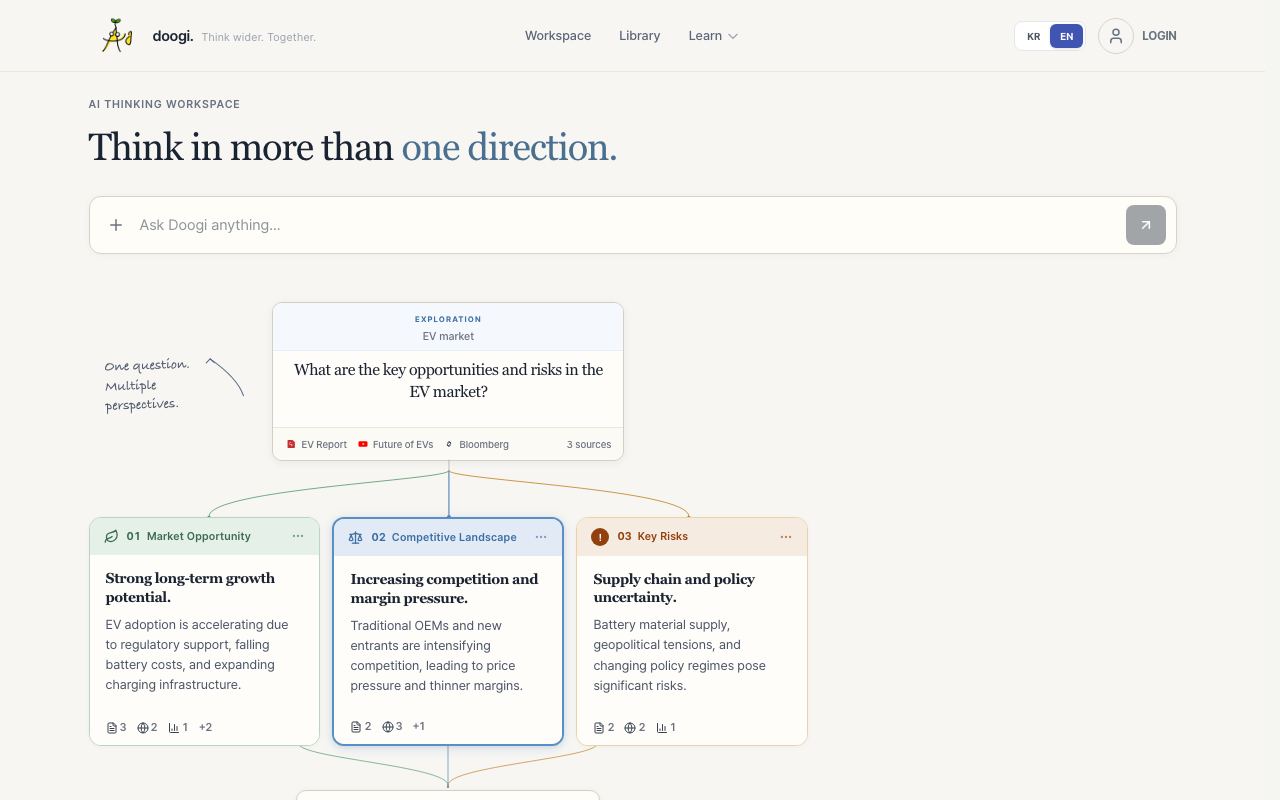
An interface for exploring multiple AI responses and following different conversation paths interactively.
WireTensors rating
Time saved: Reduces prompt iteration and model comparison time by ~1–2 hours/week for users regularly comparing outputs across 3+ models..
Key facts
| Tool | Doogi |
|---|---|
| Category | Productivity |
| Pricing | Pricing not publicly listed at time of review |
| Free tier | Yes |
| WireTensors rating | 3.2 / 5 |
| Best for | Researchers and content creators who routinely compare multiple AI perspectives on the same query. |
| Avoid if | You primarily use a single AI model or rarely need side-by-side output comparison. |
| Affiliate commission | Pending affiliate program review |
| Cookie window | N/A |
| Last verified | 2026-09-10 |
Overview
Doogi is a web-based interface for interacting with multiple AI models in a single session, allowing users to send the same prompt to different LLMs and view responses side-by-side. The project was shared on Show HN with minimal community engagement (1 point), suggesting early-stage development and unclear market demand. The tool is maintained by an independent developer or small team; no corporate backing is documented. Access is free via doogi.it; no premium tier is listed. Core features include prompt submission, model selection, branching conversation paths (allowing users to follow different threads from a single starting prompt), and side-by-side comparison. The tool does not train models, host LLMs, or generate content independently; it is an interface layer that orchestrates API calls to external LLM providers. Doogi occupies a niche between single-model chat interfaces (ChatGPT, Claude, Gemini—all in catalogue) and full prompt engineering platforms (Promptbase, PromptingGuide). Its closest analogue is manual multi-window comparison, which is tedious; however, platforms like Hugging Face Spaces, OpenRouter, and some in-house tools offer similar functionality. Significant unknowns include which LLM providers Doogi integrates with, how authentication and API keys are managed, whether conversations are logged server-side, and whether any model outputs are used to train or improve the tool. The branching conversation metaphor is conceptually sound but lacks detail on UX implementation. Early adoption is minimal; the Show HN thread did not generate substantive discussion.
Pros
- Enables side-by-side comparison of different AI model outputs for the same prompt without switching between tools
- Branching conversation paths allow users to explore alternative directions without losing context from the original thread
- Low-friction UI reduces friction compared to manually copying prompts across multiple chat windows
Cons
- Show HN received only 1 point of community engagement, suggesting limited differentiation or clarity of value proposition
- No visible documentation of which LLM providers or models are supported
- Unclear how conversations are stored, exported, or integrated with downstream workflows
Who it is for
- Best for: Researchers and content creators who routinely compare multiple AI perspectives on the same query..
- Avoid if: You primarily use a single AI model or rarely need side-by-side output comparison..
Who this is for
Content writers evaluating different tones and styles from multiple models. UX researchers comparing model outputs for bias or quality. Students exploring diverse perspectives on open-ended questions. Teams prototyping prompts and wanting rapid model comparison without platform switching.
Who should skip this
Teams with strong preference for a single LLM provider. Users working offline or in restricted environments without web access. Organisations with data residency or IP concerns about storing conversations on a third-party service.
Verdict
Doogi solves a small but real problem—multi-model comparison—in a clean interface. However, minimal community traction, sparse documentation, and unclear model coverage suggest it remains a side project rather than a mature productivity tool. Worth monitoring, but not recommended for teams needing production-grade model comparison workflows.
User reviews
Real reader reviews — separate from WireTensors' own editorial rating above. Every submission is moderated before it appears here.
Loading reviews…
Write a review
Doogi FAQ
What is Doogi? +
Doogi is a web-based interface for interacting with multiple AI models in a single session, allowing users to send the same prompt to different LLMs and view responses side-by-side. The project was shared on Show HN with minimal community engagement (1 point), suggesting early-stage development and unclear market demand. The tool is maintained by an independent developer or small team; no corporate backing is documented. Access is free via doogi.it; no premium tier is listed. Core features include prompt submission, model selection, branching conversation paths (allowing users to follow different threads from a single starting prompt), and side-by-side comparison. The tool does not train models, host LLMs, or generate content independently; it is an interface layer that orchestrates API calls to external LLM providers. Doogi occupies a niche between single-model chat interfaces (ChatGPT, Claude, Gemini—all in catalogue) and full prompt engineering platforms (Promptbase, PromptingGuide). Its closest analogue is manual multi-window comparison, which is tedious; however, platforms like Hugging Face Spaces, OpenRouter, and some in-house tools offer similar functionality. Significant unknowns include which LLM providers Doogi integrates with, how authentication and API keys are managed, whether conversations are logged server-side, and whether any model outputs are used to train or improve the tool. The branching conversation metaphor is conceptually sound but lacks detail on UX implementation. Early adoption is minimal; the Show HN thread did not generate substantive discussion.
How much does Doogi cost? +
Doogi pricing: Pricing not publicly listed at time of review. Always confirm current pricing on the official site, as plans change.
Does Doogi have a free tier? +
Yes. Doogi offers a free plan or free credits you can use to evaluate it.
What is Doogi best for? +
Researchers and content creators who routinely compare multiple AI perspectives on the same query..
When should you avoid Doogi? +
Avoid Doogi if: You primarily use a single AI model or rarely need side-by-side output comparison..
What are the main pros of Doogi? +
Enables side-by-side comparison of different AI model outputs for the same prompt without switching between tools; Branching conversation paths allow users to explore alternative directions without losing context from the original thread; Low-friction UI reduces friction compared to manually copying prompts across multiple chat windows.
What are the main cons of Doogi? +
Show HN received only 1 point of community engagement, suggesting limited differentiation or clarity of value proposition; No visible documentation of which LLM providers or models are supported; Unclear how conversations are stored, exported, or integrated with downstream workflows.
Does Doogi have an affiliate program? +
No public affiliate program is listed for Doogi at the time of review.
How is Doogi rated? +
WireTensors rates Doogi 3.2 out of 5, based on capability, value, and fit for its intended use case.
What category does Doogi fall under? +
Doogi is categorised under productivity on WireTensors.
When was this Doogi review last verified? +
This review was last verified on 2026-09-10 against the vendor's official site.
Reviewed by Arjun Mehta
Editorial lead overseeing WireTensors' research, sourcing and verification process
Last verified:
Sources
- Doogi — official website — verified