Delightful Cells review
Reliable AI batch processing for spreadsheet tasks and data transformation.
WireTensors rating
Time saved: Saves approximately 3–5 hours per week on repetitive data cleaning, transformation, and enrichment tasks for teams processing 100+ rows of data daily, eliminating manual formula writing and validation cycles..
Key facts
| Tool | Delightful Cells |
|---|---|
| Category | Productivity |
| Pricing | Pricing not publicly listed at time of review |
| Free tier | Yes |
| WireTensors rating | 3.8 / 5 |
| Best for | Data analysts and business process teams needing reliable, cost-effective batch processing of repetitive spreadsheet transformations and data enrichment tasks. |
| Avoid if | You need interactive, real-time spreadsheet collaboration or have strict data residency requirements that cloud-based processing cannot meet. |
| Affiliate commission | Pending affiliate program review |
| Cookie window | N/A |
| Last verified | 2026-09-20 |
Overview
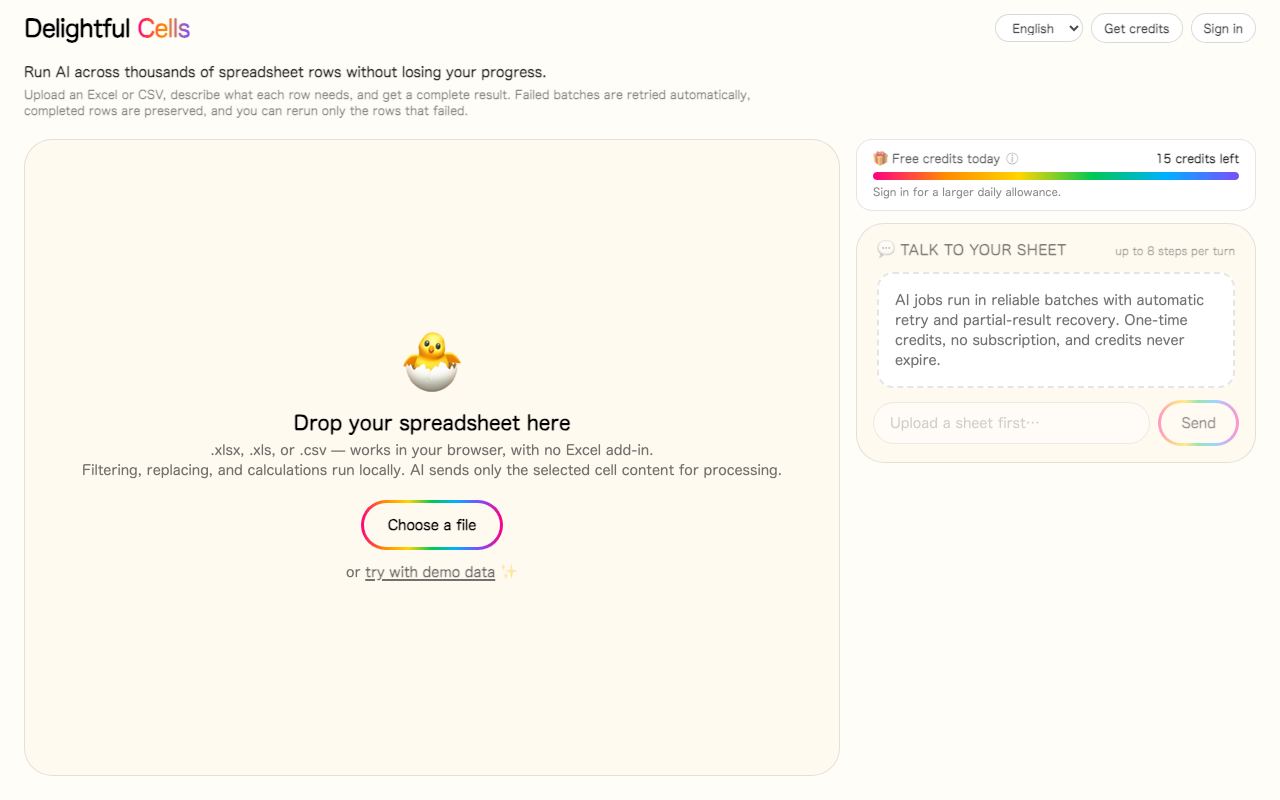
Delightful Cells is a batch processing system for AI-assisted spreadsheet workflows, launched recently and highlighted on Hacker News. It addresses a specific gap: most AI tools excel at interactive, chat-driven tasks, but organisations often need reliable, asynchronous processing of entire spreadsheets in one go. The product handles data transformation, enrichment, and cleaning via batch jobs rather than row-by-row API calls, reducing latency and cost. The underlying technology appears to combine large language model inference (likely via OpenAI or similar) with spreadsheet parsing libraries to understand tabular context. Developer is a small team; full company information is not prominent on the website. Pricing is not publicly listed at time of review, though the mention of
Pros
- Designed specifically for batch processing, reducing per-task overhead and cost compared to interactive APIs
- Focuses on reliability for spreadsheet workflows, addressing a common pain point in data pipelines
- Shows understanding of a specific, underserved niche: AI-assisted spreadsheet automation
Cons
- Minimal public information on supported spreadsheet platforms (Excel, Google Sheets, etc.)
- Unclear whether it integrates with existing workflow tools or requires manual data import
- No transparent pricing model makes budget planning difficult for potential users
Who it is for
- Best for: Data analysts and business process teams needing reliable, cost-effective batch processing of repetitive spreadsheet transformations and data enrichment tasks..
- Avoid if: You need interactive, real-time spreadsheet collaboration or have strict data residency requirements that cloud-based processing cannot meet..
Who this is for
Data analysts, financial reporting teams, and business operations managers working with large spreadsheet datasets. Relevant for business intelligence professionals automating monthly data reconciliation, product managers building data pipelines for analytics, and finance controllers managing multi-source data consolidation. Also suitable for no-code automation practitioners seeking to augment Zapier or Make workflows with AI-powered spreadsheet logic.
Who should skip this
Teams already satisfied with native spreadsheet formulas or built-in data tools should evaluate whether AI-assisted transformation truly adds value. Organisations with strict data governance policies prohibiting third-party cloud processing of sensitive financial or customer data. Small businesses with simple, one-off spreadsheet tasks will likely find the setup overhead not worthwhile.
Verdict
prefix suggests the team may be still determining monetisation strategy. A free tier is indicated, making it accessible for prototyping. Integration method is unclear—likely web UI plus possible API/script support for direct spreadsheet applications. Use cases include financial consolidation (combining multiple source sheets), enriching customer databases with third-party data, cleaning messy CSVs before analytics ingestion, and generating summary reports from raw transaction data. In the broader landscape, Delightful Cells occupies a middle ground between manual formula writing and expensive workflow platforms like Zapier or n8n; it sacrifices real-time interactivity for cost-efficiency and simplicity. Key limitations include undefined pricing, unclear platform support matrix, and no published performance metrics (latency, throughput, error rates).
User reviews
Real reader reviews — separate from WireTensors' own editorial rating above. Every submission is moderated before it appears here.
Loading reviews…
Write a review
Delightful Cells FAQ
What is Delightful Cells? +
Delightful Cells is a batch processing system for AI-assisted spreadsheet workflows, launched recently and highlighted on Hacker News. It addresses a specific gap: most AI tools excel at interactive, chat-driven tasks, but organisations often need reliable, asynchronous processing of entire spreadsheets in one go. The product handles data transformation, enrichment, and cleaning via batch jobs rather than row-by-row API calls, reducing latency and cost. The underlying technology appears to combine large language model inference (likely via OpenAI or similar) with spreadsheet parsing libraries to understand tabular context. Developer is a small team; full company information is not prominent on the website. Pricing is not publicly listed at time of review, though the mention of
How much does Delightful Cells cost? +
Delightful Cells pricing: Pricing not publicly listed at time of review. Always confirm current pricing on the official site, as plans change.
Does Delightful Cells have a free tier? +
Yes. Delightful Cells offers a free plan or free credits you can use to evaluate it.
What is Delightful Cells best for? +
Data analysts and business process teams needing reliable, cost-effective batch processing of repetitive spreadsheet transformations and data enrichment tasks..
When should you avoid Delightful Cells? +
Avoid Delightful Cells if: You need interactive, real-time spreadsheet collaboration or have strict data residency requirements that cloud-based processing cannot meet..
What are the main pros of Delightful Cells? +
Designed specifically for batch processing, reducing per-task overhead and cost compared to interactive APIs; Focuses on reliability for spreadsheet workflows, addressing a common pain point in data pipelines; Shows understanding of a specific, underserved niche: AI-assisted spreadsheet automation.
What are the main cons of Delightful Cells? +
Minimal public information on supported spreadsheet platforms (Excel, Google Sheets, etc.); Unclear whether it integrates with existing workflow tools or requires manual data import; No transparent pricing model makes budget planning difficult for potential users.
Does Delightful Cells have an affiliate program? +
No public affiliate program is listed for Delightful Cells at the time of review.
How is Delightful Cells rated? +
WireTensors rates Delightful Cells 3.8 out of 5, based on capability, value, and fit for its intended use case.
What category does Delightful Cells fall under? +
Delightful Cells is categorised under productivity on WireTensors.
When was this Delightful Cells review last verified? +
This review was last verified on 2026-09-20 against the vendor's official site.
Reviewed by Arjun Mehta
Editorial lead overseeing WireTensors' research, sourcing and verification process
Last verified:
Sources
- Delightful Cells — official website — verified