Agent Shell review
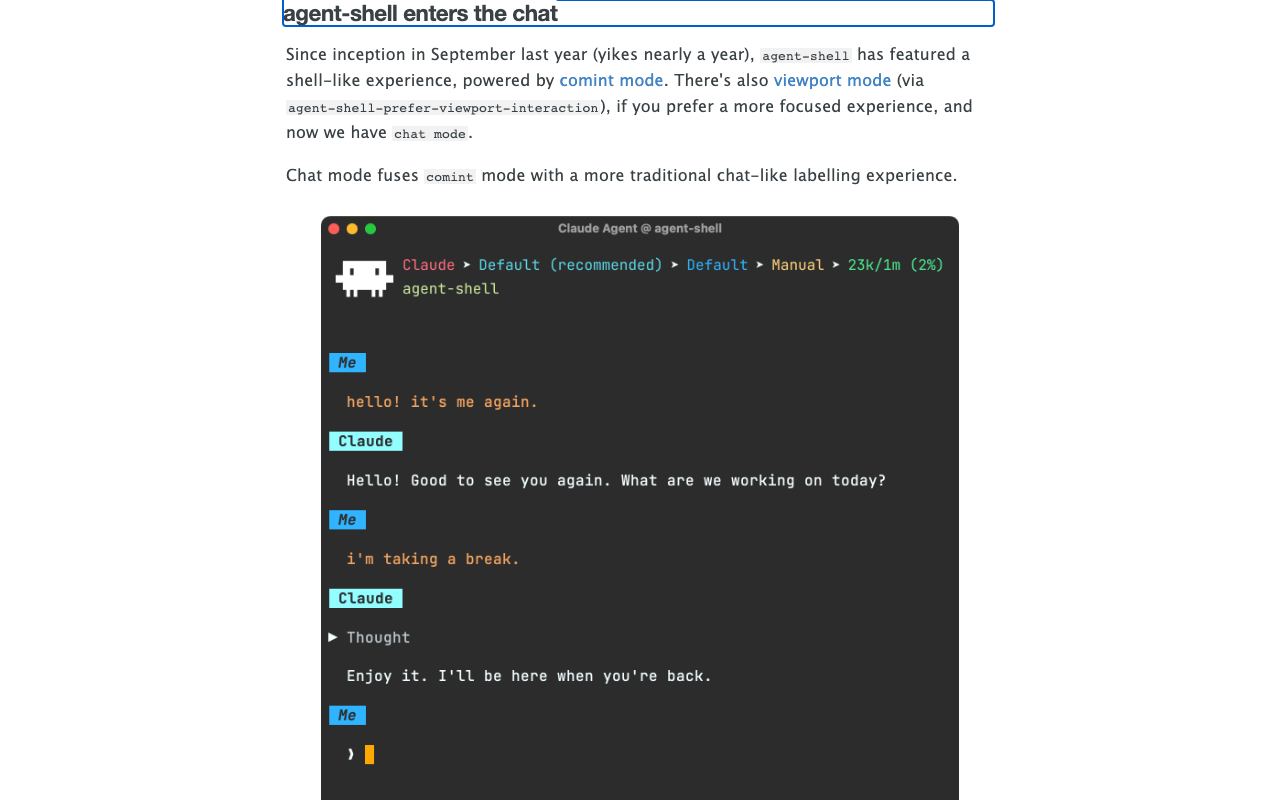
Vendor-neutral chat interface for interacting with multiple AI agents directly inside Emacs.
WireTensors rating
Time saved: Saves ~1–2 hours/week for Emacs-native developers by eliminating context switching between editor and external chat tabs; onboarding and configuration may offset gains initially..
Key facts
| Tool | Agent Shell |
|---|---|
| Category | Productivity |
| Pricing | Free (open-source) |
| Free tier | Yes |
| WireTensors rating | 3.6 / 5 |
| Best for | Emacs power users and software developers who want unified, scriptable access to multiple AI agents without leaving their editor. |
| Avoid if | You are new to Emacs, prefer graphical chat interfaces, or need a tool that works with minimal configuration. |
| Affiliate commission | Pending affiliate program review |
| Cookie window | N/A |
| Last verified | 2026-08-15 |
Overview
Agent Shell is an open-source Emacs package enabling vendor-neutral, multi-agent AI chat directly within the editor. Developed and maintained by Álvaro Ramírez (xenodium), it allows users to switch between different AI backends—such as Claude, GPT, Llama, or local models—without re-learning a UI for each. The package exposes a chat buffer within Emacs where users issue commands and receive responses; the underlying architecture abstracts vendor APIs, meaning swapping between OpenAI and Anthropic requires only configuration changes rather than UI re-learning. It is built in Emacs Lisp, making it fully scriptable and extensible for power users. As a free, open-source project with no commercial backing, it carries no SLA, paid support, or guaranteed uptime. The recent version 0.73 update added chat-specific improvements, indicating active maintenance. Agent Shell does not implement its own LLM; instead, it acts as a client library routing requests to third-party APIs or local models via standard protocols. Typical users are Emacs enthusiasts working on programming, system administration, or text-heavy tasks who want AI assistance without switching applications. Compared to web-based chat (ChatGPT, Claude.ai), Agent Shell trades convenience and polish for integration, scripting, and vendor flexibility. Compared to IDE-integrated AI tools like GitHub Copilot or Cursor, it offers broader model choice and non-commercial licensing but less bespoke programming support. Limitations include a steep learning curve for non-Emacs users, modest community size (limiting third-party integrations), and lack of graphical richness such as code syntax highlighting in responses or image rendering.
Pros
- Vendor-neutral; supports multiple AI backends without lock-in
- Integrates seamlessly into Emacs workflow for developers already using the editor
- Open-source and actively maintained with recent updates
Cons
- Extremely steep learning curve; requires Emacs and Lisp proficiency
- Small user base means limited community support and third-party integrations
- Limited graphical feedback compared to dedicated chat interfaces
Who it is for
- Best for: Emacs power users and software developers who want unified, scriptable access to multiple AI agents without leaving their editor..
- Avoid if: You are new to Emacs, prefer graphical chat interfaces, or need a tool that works with minimal configuration..
Who this is for
This tool is for experienced Emacs users, particularly software engineers, system administrators, and researchers who spend most of their day in the editor and seek integrated AI agent access. Developers building custom Emacs configurations or exploring AI agent orchestration via Lisp scripts are the primary audience. Open-source contributors valuing vendor neutrality and customisation depth will also appreciate it.
Who should skip this
Anyone unfamiliar with Emacs, Lisp, or text-based editing environments should not attempt this tool. Non-developers, teams relying on GUI chat applications, and those seeking rapid setup without configuration should use ChatGPT, Claude.ai, or other mainstream chat interfaces. Organisations requiring vendor support or SLA guarantees will find open-source Emacs packages insufficient.
Verdict
Agent Shell is a sophisticated tool for Emacs devotees seeking vendor-neutral AI agent access without vendor lock-in. Setup and ongoing customisation require Lisp fluency. Not for casual users, but invaluable for open-source advocates and terminal-resident developers.
User reviews
Real reader reviews — separate from WireTensors' own editorial rating above. Every submission is moderated before it appears here.
Loading reviews…
Write a review
Agent Shell FAQ
What is Agent Shell? +
Agent Shell is an open-source Emacs package enabling vendor-neutral, multi-agent AI chat directly within the editor. Developed and maintained by Álvaro Ramírez (xenodium), it allows users to switch between different AI backends—such as Claude, GPT, Llama, or local models—without re-learning a UI for each. The package exposes a chat buffer within Emacs where users issue commands and receive responses; the underlying architecture abstracts vendor APIs, meaning swapping between OpenAI and Anthropic requires only configuration changes rather than UI re-learning. It is built in Emacs Lisp, making it fully scriptable and extensible for power users. As a free, open-source project with no commercial backing, it carries no SLA, paid support, or guaranteed uptime. The recent version 0.73 update added chat-specific improvements, indicating active maintenance. Agent Shell does not implement its own LLM; instead, it acts as a client library routing requests to third-party APIs or local models via standard protocols. Typical users are Emacs enthusiasts working on programming, system administration, or text-heavy tasks who want AI assistance without switching applications. Compared to web-based chat (ChatGPT, Claude.ai), Agent Shell trades convenience and polish for integration, scripting, and vendor flexibility. Compared to IDE-integrated AI tools like GitHub Copilot or Cursor, it offers broader model choice and non-commercial licensing but less bespoke programming support. Limitations include a steep learning curve for non-Emacs users, modest community size (limiting third-party integrations), and lack of graphical richness such as code syntax highlighting in responses or image rendering.
How much does Agent Shell cost? +
Agent Shell pricing: Free (open-source). Always confirm current pricing on the official site, as plans change.
Does Agent Shell have a free tier? +
Yes. Agent Shell offers a free plan or free credits you can use to evaluate it.
What is Agent Shell best for? +
Emacs power users and software developers who want unified, scriptable access to multiple AI agents without leaving their editor..
When should you avoid Agent Shell? +
Avoid Agent Shell if: You are new to Emacs, prefer graphical chat interfaces, or need a tool that works with minimal configuration..
What are the main pros of Agent Shell? +
Vendor-neutral; supports multiple AI backends without lock-in; Integrates seamlessly into Emacs workflow for developers already using the editor; Open-source and actively maintained with recent updates.
What are the main cons of Agent Shell? +
Extremely steep learning curve; requires Emacs and Lisp proficiency; Small user base means limited community support and third-party integrations; Limited graphical feedback compared to dedicated chat interfaces.
Does Agent Shell have an affiliate program? +
No public affiliate program is listed for Agent Shell at the time of review.
How is Agent Shell rated? +
WireTensors rates Agent Shell 3.6 out of 5, based on capability, value, and fit for its intended use case.
What category does Agent Shell fall under? +
Agent Shell is categorised under productivity on WireTensors.
When was this Agent Shell review last verified? +
This review was last verified on 2026-08-15 against the vendor's official site.
Reviewed by Arjun Mehta
Editorial lead overseeing WireTensors' research, sourcing and verification process
Last verified:
Sources
- Agent Shell — official website — verified